

Is Wi-Fi bad, and how to eliminate it from your home while still having internet. We also explore how the modern modems like Xfinity still give off Wi-Fi even when the Wi-Fi is shut off and how to use LAN lines to get internet without the EMF.
An EMF and Privacy Nightmare and how to Hardwire your home for internet.
How to eliminate Wi-fi from your home and why.
This is a journey that took us down rabbit holes, searches for hidden information, and more conspiracy than I could hold in my head. The problem was that it all came to be true!
Back in 2018, we hosted one of RFK Jr’s attorneys, Dafna Tachover, and Building Biologist Brian Hoyer, at our summer retreat in Minnesota. They both taught about EMF. Dafna gave us the science, the background and the evidence of harm. Brian brought EMF testing tools and showed us the invisible EMF all around us in a way we could actually see and hear it.

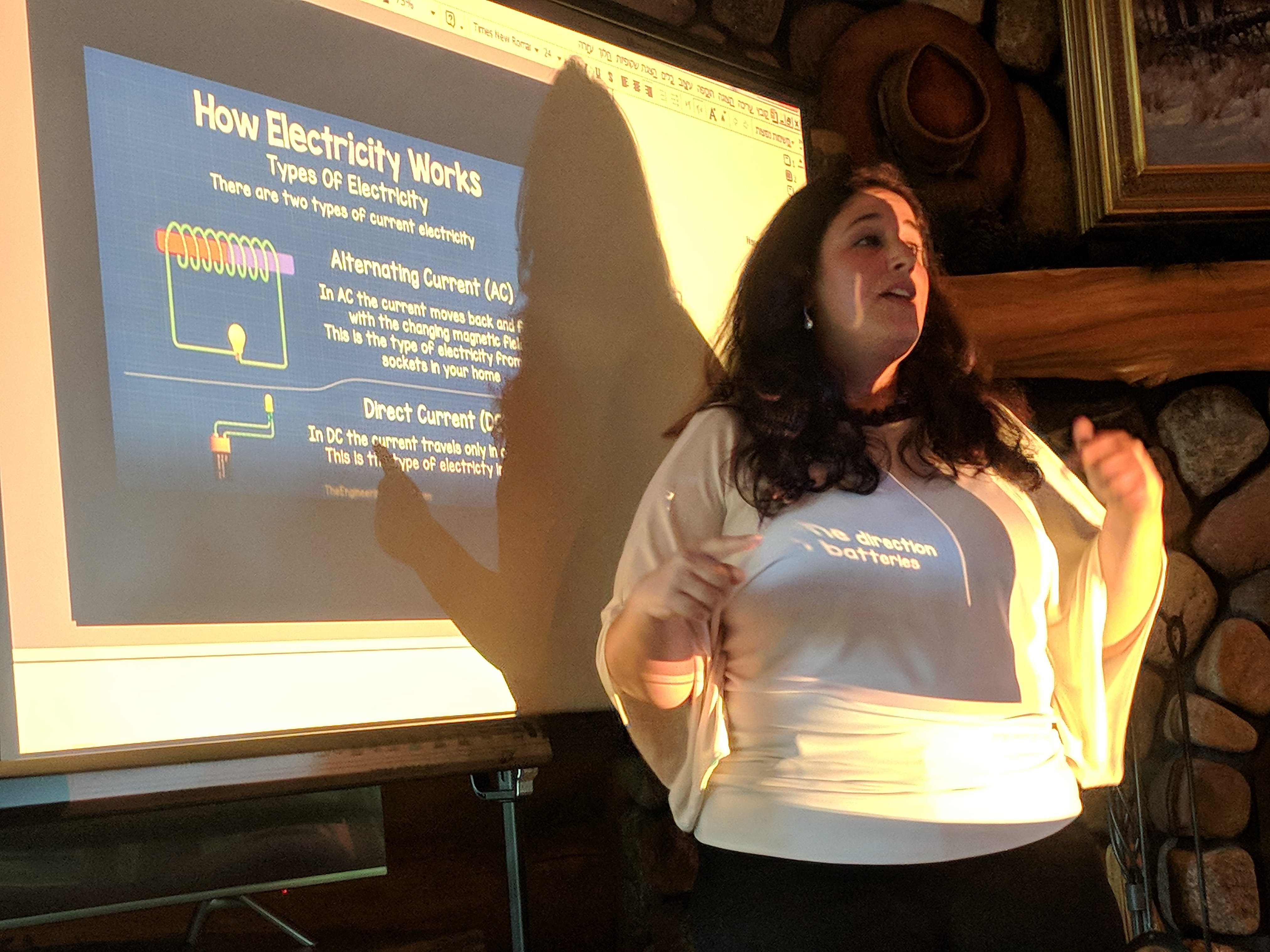

What we learned changed our minds and our home forever.
What’s WIFI Got To Do With It?
We are all bombarded by WIFI signals 24/7.
Whether you have a WIFI router in your home or at work, this is nearly impossible to avoid.
In addition, walking into the coffee shop, grocery store, gym, and even your local school will bombard you with industrial strength WIFI signals.
Here’s what the latest research on WIFI shows:
“Only a small portion of published research papers refers to the “real” health impact of Wi-Fi technologies on children, because they are simply not available. Results from animal studies are rarely fully transferable to humans. As highly controlled laboratory exposure experiments do not reflect real physical interaction between RF radiation fields with biological tissue, dosimetry methods, protocols, and instrumentation need constant improvement.” study found here.
What we know is that since the late 1800s the US government and military has been investigating EMF(Electro Magnetic Fields) impacts of their personnel. These are military workers affected by working on radar typically and now microwave communications.
Over 5,000 published papers, many of those from the US military, have been published showing biological effect of these EMF radiation on biology.
Research on Biological Effects of EMF are Hidden
What isn’t well known is that investigation into the effects of EMF, particularly in the Microwave range, has. been hidden and in many cases, ceased.
This is because military communication relies on microwaves. These are used in radar, warning systems, communications, spyware and more.
The military does not want to give any of this up and it continues to expand year after year.
In addition, the tech industry does not want anyone to think that the laptops, WIFI routers, cellphones, bluetooth headphones could possibly be harming us.
Therefore, the EPA, who has raised concerns about EMF and cellphones has been asked to cease and desist any testing.
The FDA, which has also questioned EMF safety has also been stymied.
Only the FCC is allowed to determine the safety of wireless communication frequencies and the FCC is made up of only 5 people, most of whom come directly from the cellphone and tech industry.
The One Study That Everyone Should Know
Our own US government spent $25 million and 10 years performing a study to definitely show that cellphones were safe.
Unfortunately, the result of this study showed clear evidence that cellphones can cause cancer.
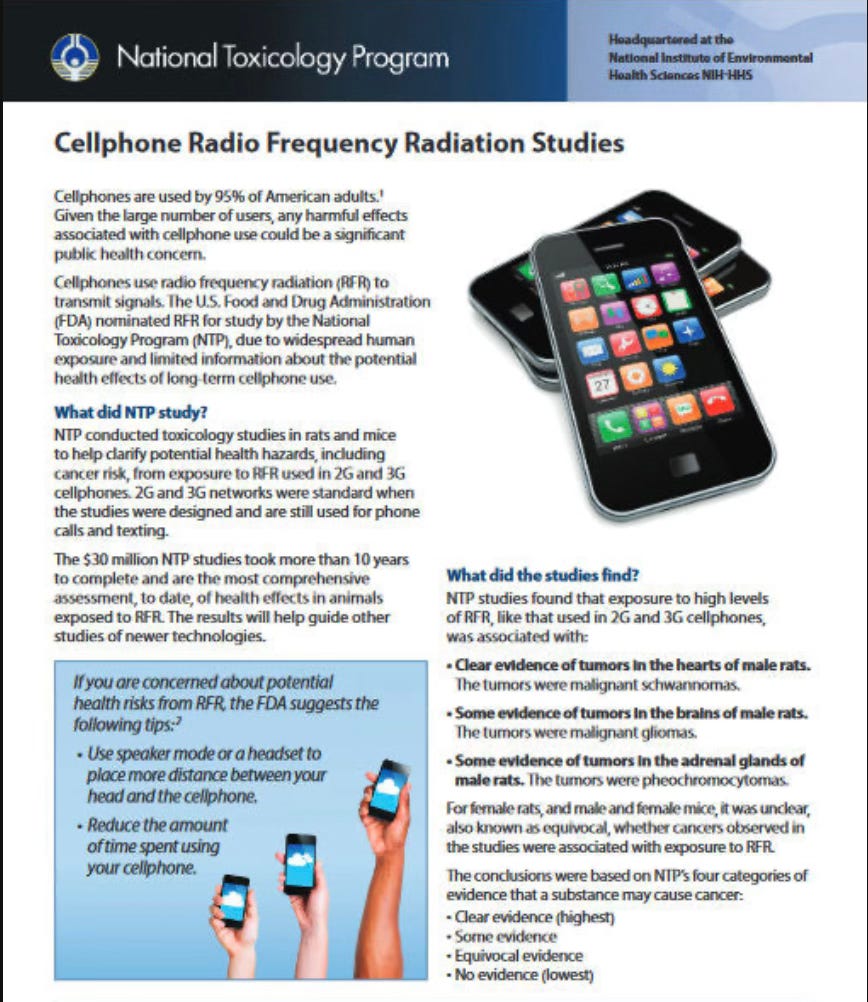
This is the only study I feel like we need to know about. The US government hired the best cancer researchers, set up a study using 2 and 3G cellphone signals and found that animals exposed to these signals developed carcinogenic tumors.
We now use 4 and 5G cellphone frequencies, but the 2 and 3G didn’t go away, they are still there, being blasted out into the world along with 4 and 5G and whatever military signals are being used including doppler radar and weather signals and satellite signals coming from Spacex Starlink.
Why We Don’t Have WiFi at Home
As most of you know, we haven’t had WIFI in our home for the last 6 years.
We do this in the name of health and privacy. We want to create as much of a primal refuge in this high powered, connected world as possible.
After learning about the effects of EMF on our body, we decided we simply weren’t available to allow WIFI into our home.
When our bodies are given rest, they can focus on repair. However, most of us are bathing in WIFI, cellphone signals, Bluetooth and more, which causes the body stress. When the body is constantly under stress it cannot heal properly.
Originally, we started using a WIFI remote to turn our WIFI off at night when we went to bed.
Eventually, we found a method to completely eliminate WIFI from our home, yet still run a business and work daily for a global company, all while staying connected at higher speeds than WIFI.
But first…
Your WIFI is Spying on You
No longer the realm of conspiracies, this is now mainstream.
So, my cable modem stopped working. I honestly do not think it just stopped working, I mean, it just sits there doing nothing. It doesn’t get moved, knocked into, or anything. Yet, my internet went out and Xfinity said my modem was at the end of its life and I needed a new one.
I disbelieve this because 2 days later when I installed an Xfinity modem, the LAN line connected internet wasn’t working on it, and they again told me my modem was at the end of it’s life and I needed to go to Xfinity and get a new one. They told me this when I literally had just, two days earlier, gone to the Xfinity store and picked up a brand new modem. The hilarious thing is that this happened again, when I got ANOTHER new Xfinity modem a day later!
When I went to Xfinity and grabbed (for the first time) one of their new modems (which they convinced me, with instructions even, and confirmed in writing, that the WIFI could be turned off - it couldn’t) and went to install the modem, I found a pop up screen that made me pause.
You see, you cannot just install a modem like in the past. In order to install a new modem, you not only have to plug it in to the outlet and to the cable coming into the house, but you have to download the Xfinity App and authorize the modem to get it to work. This never actually turns the modem on, at least in my experience in the last 9 days going through 5 modems!
No, you have to then get a “tech support” person from India to connect into the app and have them run some checks and then turn on the modem.
I spent over 10 hours on the app in the last 9 days with live techs helping me turn on my modems.
Anyway, the first of the 4 modems I brought into the house made me use the app to turn it on. It didn’t work and they had to send a tech out to my house.
The tech took 4 days to get here (all while I had no internet and all due to the Xfinity modem they gave me at the Xfinity store) and check everything out.
By the end of the 4 hours the tech was here, it was determined I needed a new modem.
He brought me a new one and asked me to use the app to turn it on.
When I opened the app this time, I came to a screen that WAS NOT THERE a few days earlier when I tried to activate the first modem.
Yet another reason to avoid WIFI in your home - It’s Spying on you!
Here’s a screenshot form my phone from my own Xfinity WIFI modem from August 11, 2026
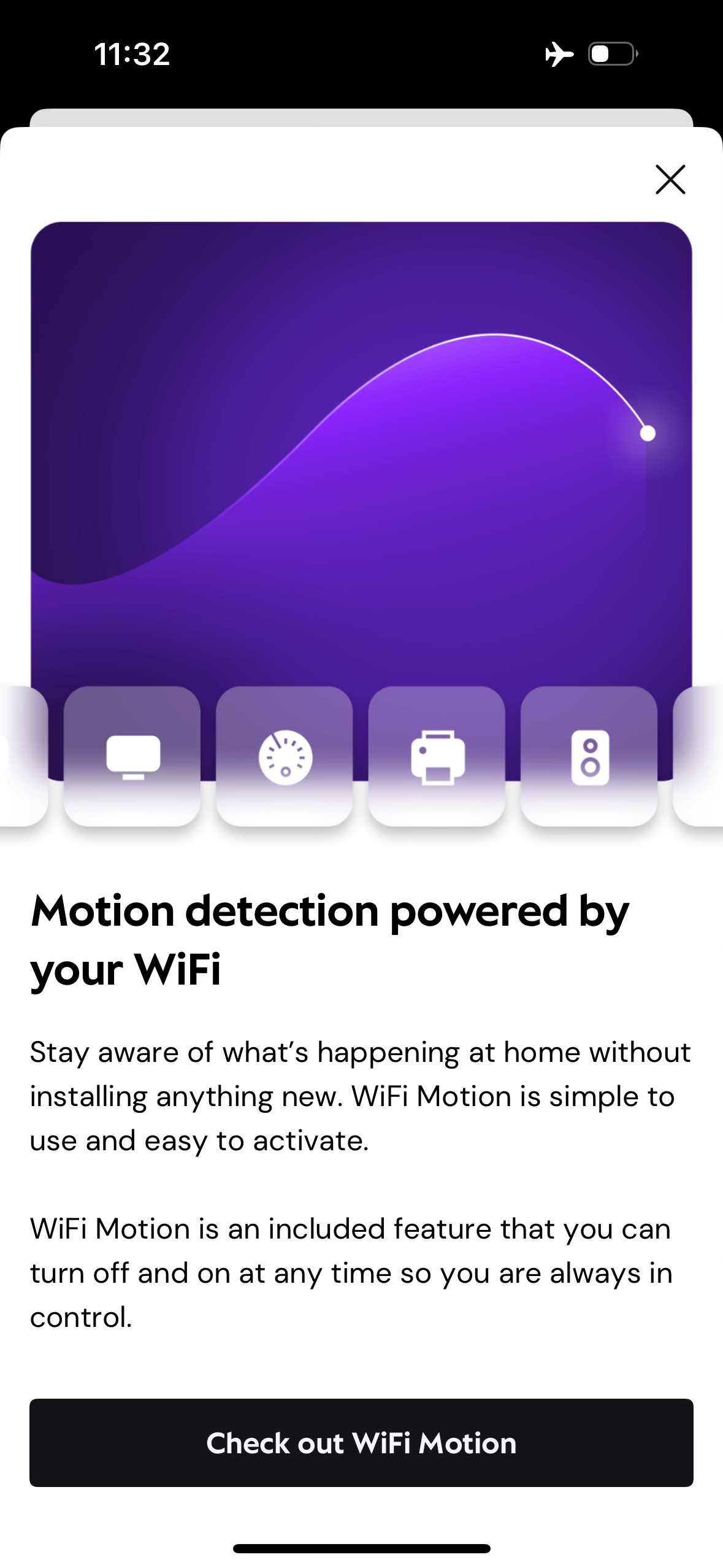
Here is the article that came to my inbox on August 18, 2026, coincidentally????
Comcast Turns Millions Of Routers Into Motion Sensors - The Same WiFi Signals Can ID You With 99.5% Accuracy
What Else is Spying on You?
Unknown Number Calling? It’s Not Random
The BBC, in a recent investigation and article, caught scam call center workers on hidden cameras as they laughed at the people they were tricking while one worker bragged about making $250k from victims. The disturbing truth? Scammers don’t pick phone numbers at random. They buy your data from brokers.
Your phone is listening, collecting data, and then that data is purchased by those who see a trend they can exploit.
Stop this with a Mic-Lock. This device plugs into your phone or laptop and stops it from listening to you. Just take it out when you need to make a phone call.
OK, Say NO to Wi-Fi Because It’s ALWAYS On!
I never know exactly how to spell out Wi-Fi (WIFI, wifi??).
Anyway, between motion sensing, cops passing by and sweeping your data by siphoning your wifi, there is another problem.
On Xfinity Modem #2 (this was modem #3 in total because my original modem that I purchased myself and owned since 2021 “died”), I got this motion sensing request. I did not turn it on, however, it is likely Xfinity is and has been using this tech for quite some time and collecting the data already. They have enough data now that they can open the feature up to “consumers”. Yay.
The other issue with Modem #2 is that the Wi-Fi does not turn off.
The Wi-Fi, which Xfinity rep in the store told me could be turned off, gave me instructions on how to turn off, and sent me to a webpage on Xfinity’s site to turn off the Wi-Fi, was not actually able to be shut down.
However, they tricked me into THINKING it was turned off. Luckily I have an EMF meter and could measure this.
Here’s how it worked:
How To Disable Your Wi-Fi (..or not)
First, I followed the directions to log into the Xfinity modem.
Second, I clicked into the Wi-Fi antennas area of the modem and selected each of the 3 radio antennas. In this case my new modem showed 3 radio antennas. These are the microwave communicators that both receive and give off microwave radiation.
There were three of them running on different frequencies:
2.4G (2.4 G on your modem just stands for 2.4Ghz which is the frequency of wave given off)
5G (5Ghz)
6G (6Ghz)
I went into each of these Wi-Fi radio buttons and “disabled” the Wi-Fi and saved my progress.
You can do this at home too. Each modem or router or both have a unique website address or IP address that is on the bottom, usually, of the device. Type this into any browser and with the login ID and password, also usually on the bottom of the device, you can access and turn off Wi-Fi (supposedly).
Here is what I did with screenshots:
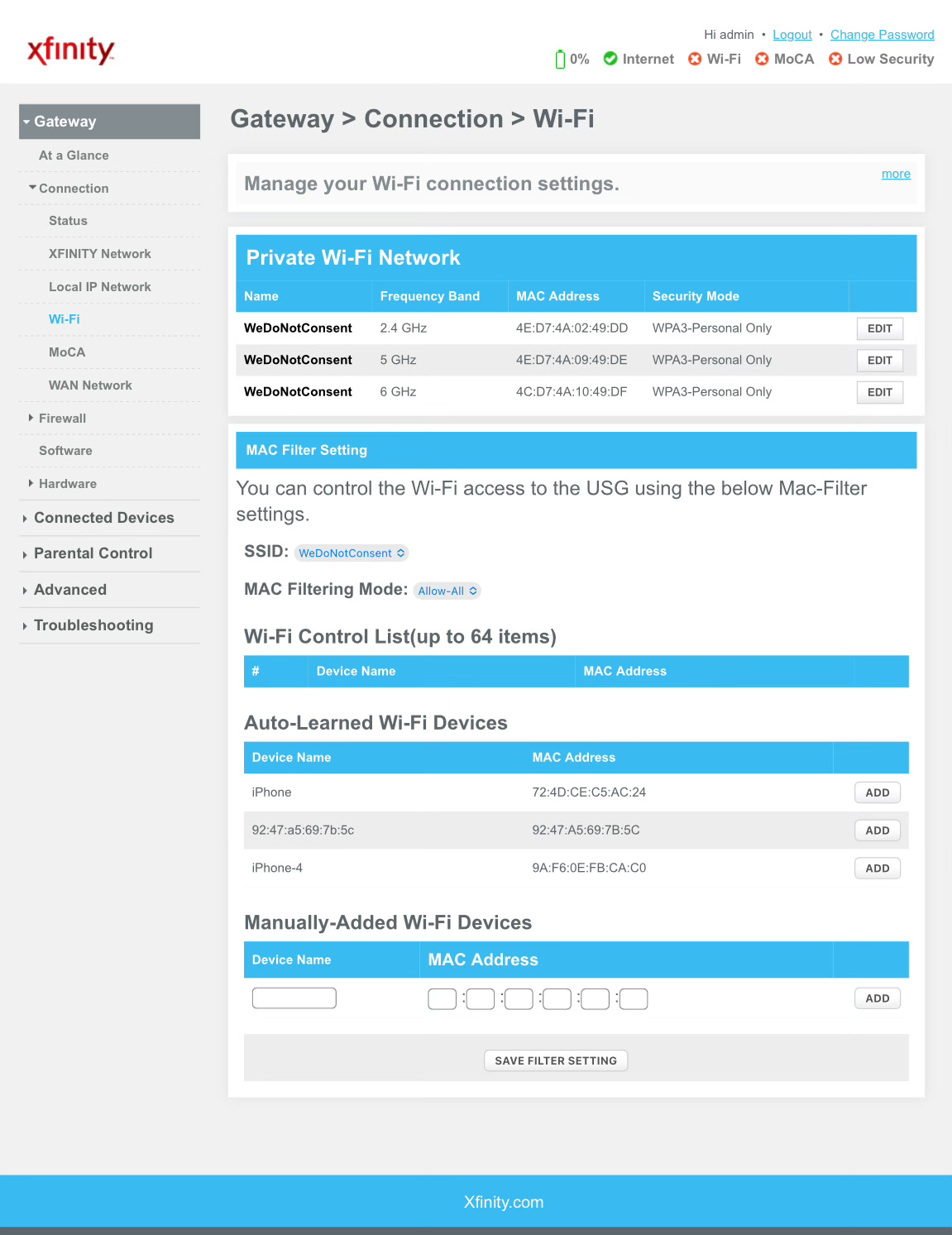
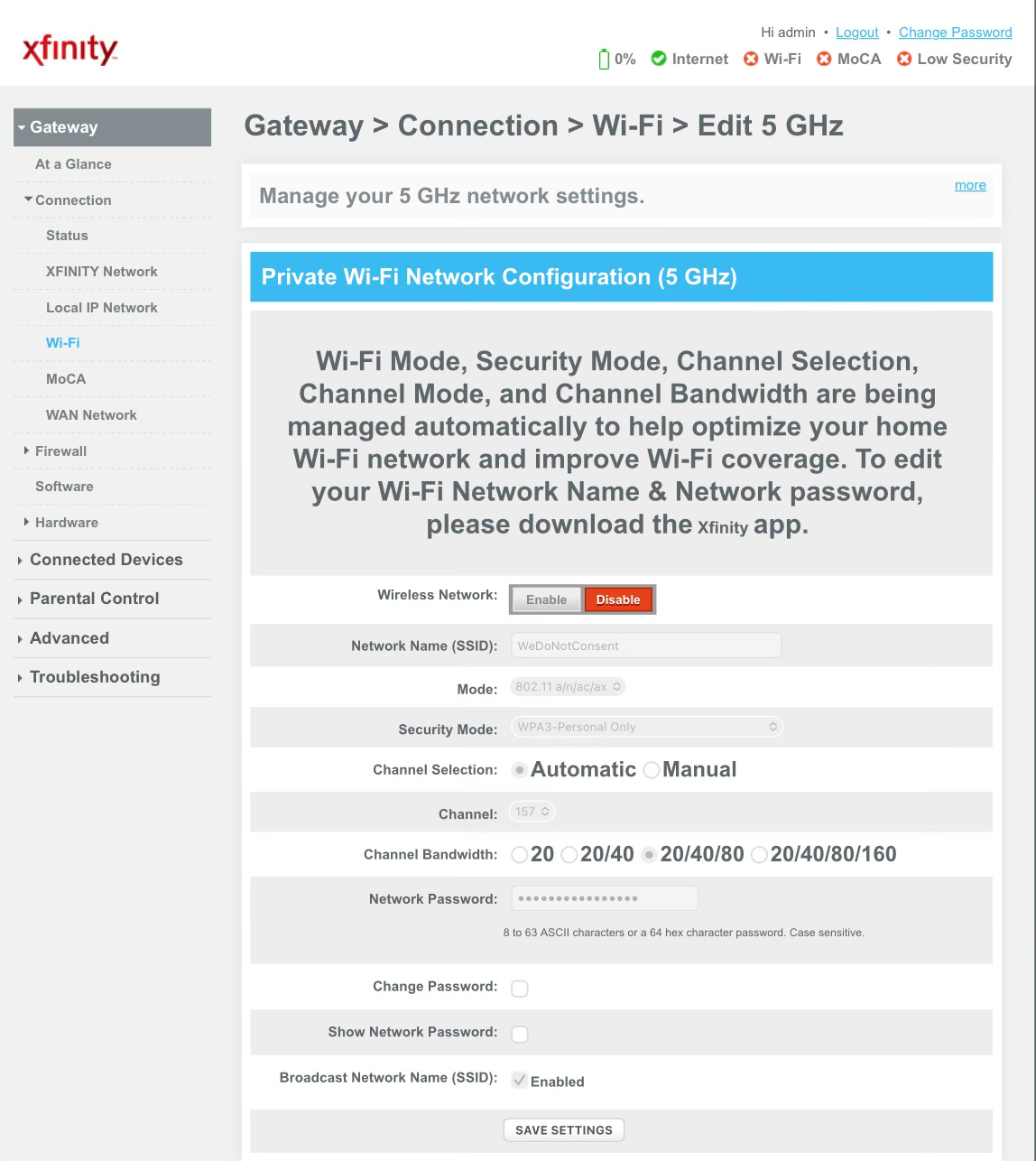
After I did this and confirmed the Wi-Fi was disabled, I took out my Accousticom 2 EMF meter to measure the microwaves coming off the modem.
It wasn’t good!
It was blasting out Wi-Fi as if I had never turned anything off.
We haven’t had Wi-Fi in our home in 6 years.
We use our EMF meter monthly to run tests for the EMF environment in our home.
We are always in the far GREEN (meaning safe) reading on the meters.
However, the meter was pinging up to red (danger).
Apparently the Xfinity modems do not allow Wi-Fi to be disabled by the user.
I have heard that if you have one of these modems, you can call Xfinity and ask them to turn off the Wi-Fi, but not you are relying on them not to turn it back on to use their motion sensing service and collect data on you. I have also heard that people that called Xfinity to turn off Wi-Fi confirmed that after Xfinity said they h ad turned it off, that it was still on.
Literally the only way to test this is to use an EMF meter and check.
Or do what we did below..
Here is a video of me testing the Wi-Fi EMF
Stay tuned for Part 2 where we show you exactly what we did to install a Wi-Fi Free set up.
What should have taken an hour to complete, took us nearly 2 weeks, 10 hours on the phone and 2 visits for a total of 6 in person hours with an Xfinity tech!